0060. 类中的只读属性
- 1. 🎯 本节内容
- 2. 🫧 评价
- 3. 🤔 “只读属性”如何声明?
- 4. 🤔 readonly 修饰符是 TS 中特有的吗?JS 中是否有 readonly 修饰符呢?
- 5. 🤔 readonly 可以与其他修饰符一起使用吗?
- 6. 🤔 如何完成“readonly 属性的初始化”?
- 7. 🤔 类可以实现带有 readonly 属性的接口吗?
- 8. 🤔 如果属性是一个对象,readonly 能防止对象内部属性被修改吗?
- 9. 🤔 如果属性是一个对象,要如何让整个对象(包括对象内层属性)是只读的?
- 10. 🤔 readonly 属性和只有 getter 的存取器属性有什么区别?
1. 🎯 本节内容
- readonly
- public
- private
- protected
- static
- Object.freeze()
- 只有 getter 的存取器属性
2. 🫧 评价
在实际使用中,掌握基本用法就足够了:
- 使用
readonly声明只读属性 - 可以与其他修饰符组合使用
- 在构造函数中初始化
- 实现接口中的只读属性
上面这些核心知识点掌握之后,基本就可以满足日常开发需求了。
和只读属性相关的一些细节也是需要留意的,如果遇到了对应的场景,需要知道都有哪些处理方案,以及不同方案之间的核心差异。
readonly修饰符和其他修饰符组合使用时,正确的书写位置?- 对象的深层次冻结应该怎么写?不同的写法之间的差异是什么?
- 使用只带有
getter的accessor属性和readonly修饰的只读属性有什么区别?只读约束是仅限于 TS 层面还是包括运行时的 JS 层面?
3. 🤔 “只读属性”如何声明?
属性名前面加上 readonly 修饰符,就表示该属性是只读的,实例对象不能修改这个属性。
ts
class A {
  readonly id = 'foo'
}

const a = new A()
a.id = 'bar' // ❌ 报错
// Cannot assign to 'id' because it is a read-only property.(2540)4. 🤔 readonly 修饰符是 TS 中特有的吗?JS 中是否有 readonly 修饰符呢?
先说答案:
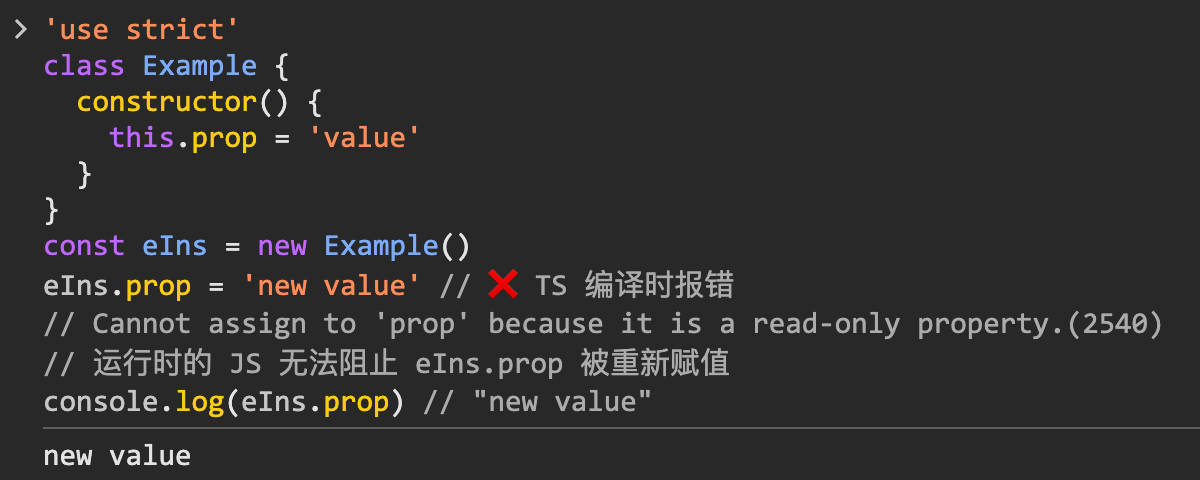
readonly修饰符是 TypeScript 特有的语法特性,在 JavaScript 中并不存在。readonly仅是 TypeScript 的编译时特性,不提供运行时保护。
4.1. 核心区别
- TypeScript 层面:
readonly提供编译时的类型检查- 仅在开发阶段提供错误提示
- JavaScript 层面:
- 编译后的 JS 代码中不包含
readonly修饰符 - 运行时无法阻止属性修改
- 编译后的 JS 代码中不包含
4.2. 示例对比
ts
class Example {
  readonly prop = 'value'
}

const eIns = new Example()
eIns.prop = 'new value' // ❌ TS 编译时报错
// Cannot assign to 'prop' because it is a read-only property.(2540)

// 运行时的 JS 无法阻止 eIns.prop 被重新赋值
console.log(eIns.prop) // "new value"js
'use strict'
class Example {
  constructor() {
    this.prop = 'value'
  }
}
const eIns = new Example()
eIns.prop = 'new value' // ❌ TS 编译时报错
// Cannot assign to 'prop' because it is a read-only property.(2540)
// 运行时的 JS 无法阻止 eIns.prop 被重新赋值
console.log(eIns.prop) // "new value"你可以将上述编译后得到的 JS 丢到浏览器控制台中测试查看结果:
4.3. 运行时约束方案
如果需要在运行时实现真正的只读效果,可以考虑使用:
Object.freeze()Object.defineProperty()- Getter-only 的 accessor
5. 🤔 readonly 可以与其他修饰符一起使用吗?
readonly 修饰符可以与以下 TypeScript 修饰符联用:
- 访问修饰符
public-> 公共访问(默认)private-> 私有访问protected-> 受保护访问
- 静态修饰符
static-> 静态属性
5.1. 注意顺序
- 访问控制修饰符
- 静态修饰符
readonly
ts
class Example {
  readonly publicProp: string = 'public readonly'

  // ❌ 错误写法:
  // readonly private  privateReadonlyProp: string = 'private readonly'
  // 'private' modifier must precede 'readonly' modifier.(1029)

  // static private readonly privateStaticProp = 'private static value'
  // 'private' modifier must precede 'static' modifier.(1029)

  // ✅ 正确写法:1. 访问控制、2. static、3. readonly
  private readonly privateReadonlyProp: string = 'private readonly'
  protected readonly protectedReadonlyProp: string = 'protected readonly'
  private static readonly privateStaticProp = 'private static value'

  method() {
    // 可以在类内部读取所有 readonly 属性
    console.log(this.publicProp)
    console.log(this.privateReadonlyProp)
    console.log(this.protectedReadonlyProp)

    // 但都不能修改:
    // this.publicProp = 'new value' // ❌ 错误
    // Cannot assign to 'publicProp' because it is a read-only property.(2540)
  }
}5.2. 正确示例
ts
class Example {
  // 基本 readonly 属性(默认 public)
  readonly prop1 = 'value1'

  // public readonly(显式声明)
  public readonly prop2 = 'value2'

  // private readonly
  private readonly prop3 = 'value3'

  // protected readonly
  protected readonly prop4 = 'value4'

  // static readonly
  static readonly staticProp = 'static value'

  // private static readonly
  private static readonly privateStaticProp = 'private static value'

  // protected static readonly
  protected static readonly protectedStaticProp = 'protected static value'

  method() {
    console.log(this.prop1)
    console.log(this.prop2)
    console.log(this.prop3) // 可以在类内部访问 private readonly
    console.log(this.prop4) // 可以在类内部访问 protected readonly
  }

  static staticMethod() {
    console.log(Example.staticProp)
    console.log(Example.privateStaticProp) // 可以在类内部访问 private static readonly
  }
}

// 外部访问示例
const example = new Example()
console.log(example.prop1) // ✅ 可以访问
console.log(example.prop2) // ✅ 可以访问
// console.log(example.prop3)  // ❌ 无法访问 private 属性
// console.log(example.prop4)  // ❌ 无法访问 protected 属性
console.log(Example.staticProp) // ✅ 可以访问静态只读属性

// 所有 readonly 属性都无法修改
// example.prop1 = 'new value'  // ❌ Cannot assign to 'prop1' because it is a read-only property
// Example.staticProp = 'new value' // ❌ Cannot assign to 'staticProp' because it is a read-only property6. 🤔 如何完成“readonly 属性的初始化”?
- 在声明时完成初始化
- 在构造函数中完成初始化
- 利用 TS 提供的语法糖“参数属性”完成初始化
ts
class Person {
  readonly name: string = 'foo'
  readonly age: number = 18
}ts
class Person {
  readonly name: string
  readonly age: number

  // 在构造函数中初始化 readonly 属性
  constructor(name: string, age: number) {
    this.name = name // ✅ 可以在构造函数中赋值
    this.name = name.repeat(3) // 也可以进行多次赋值
    this.age = age // ✅ 可以在构造函数中赋值
  }
}ts
class Person {
  constructor(readonly name: string, readonly age: number) {}
}下面是编译后得到的 JS 代码:
js
'use strict'
class Person {
  constructor() {
    this.name = 'foo'
    this.age = 18
  }
}js
'use strict'
class Person {
  // 在构造函数中初始化 readonly 属性
  constructor(name, age) {
    this.name = name // ✅ 可以在构造函数中赋值
    this.name = name.repeat(3) // 也可以进行多次赋值
    this.age = age // ✅ 可以在构造函数中赋值
  }
}ts
'use strict'
class Person {
  constructor(name, age) {
    this.name = name
    this.age = age
  }
}7. 🤔 类可以实现带有 readonly 属性的接口吗?
可以。
- 类可以实现定义了 readonly 属性的接口。
- 需要注意的是,不要添加其他的修饰符,只能使用默认的 public 修饰符。
ts
interface User {
  readonly id: number
  readonly name: string
}

// ✅ 正确:使用 public(默认或显式)
class UserImpl1 implements User {
  readonly id: number
  readonly name: string
  constructor(id: number, name: string) {
    this.id = id
    this.name = name
  }
}

class UserImpl2 implements User {
  public readonly id: number
  public readonly name: string
  constructor(id: number, name: string) {
    this.id = id
    this.name = name
  }
}

// 1、2 的写法是等效的,public 就是默认的访问修饰符。

// ❌ 错误:不能使用 protected 或 private 或 static
class UserImpl3 implements User {
  protected readonly id: number
  protected readonly name: string
  constructor(id: number, name: string) {
    this.id = id
    this.name = name
  }
}
// Class 'UserImpl3' incorrectly implements interface 'User'.
// Property 'id' is protected in type 'UserImpl3' but public in type 'User'.(2420)

class UserImpl4 implements User {
  private readonly id: number
  private readonly name: string
  constructor(id: number, name: string) {
    this.id = id
    this.name = name
  }
}
// Class 'UserImpl4' incorrectly implements interface 'User'.
// Property 'id' is private in type 'UserImpl4' but not in type 'User'.(2420)

class UserImpl5 implements User {
  static readonly id: number
  static readonly name: string
}
// Class 'UserImpl5' incorrectly implements interface 'User'.
// Type 'UserImpl5' is missing the following properties from type 'User': id, name(2420)8. 🤔 如果属性是一个对象,readonly 能防止对象内部属性被修改吗?
不能,readonly 只能防止属性本身的重新赋值,不能防止对象内部属性的修改:
ts
class Container {
  readonly config = {
    theme: 'dark',
    lang: 'en',
  }

  method() {
    // ❌ 不能重新赋值整个 config 对象
    // this.config = { theme: 'light', lang: 'zh' }
    // Cannot assign to 'config' because it is a read-only property.(2540)

    // ✅ 但可以修改 config 对象内部的属性
    this.config.theme = 'light' // 这是可以的
    this.config.lang = 'zh' // 这也是可以的
  }
}

// 如果要完全禁止修改,应该使用 Object.freeze 或其他不可变方案9. 🤔 如果属性是一个对象,要如何让整个对象(包括对象内层属性)是只读的?
要让整个对象(包括内层属性)都是只读的,可以使用以下几种方法:
- 类型工具
Readonly、ReadonlyArray - 自定义类型工具,比如支持递归的
DeepReadonly Object.freeze=> 特点:会对运行时造成影响as const断言 => 很简洁,推荐使用
9.1. 使用 Readonly 类型工具
ts
class Container {
  // 使用 Readonly 工具类型
  readonly config: Readonly<{
    theme: string
    lang: string
    nested: {
      level: number
    }
  }> = {
    theme: 'dark',
    lang: 'en',
    nested: {
      level: 1,
    },
  }

  method() {
    // ❌ 不能重新赋值整个对象
    // this.config = { theme: 'light', lang: 'zh', nested: { level: 2 } }
    // ❌ 也不能修改内部属性
    // this.config.theme = 'light'

    // ✅ 第一层不能改,但是可以改第二层
    this.config.nested.level = 2
  }
}使用 Readonly 有一个弊端,就是它只能冻结第一层,再深层的就爱莫能助了。
这是由 Readonly 定义决定的:
ts
type Readonly<T> = { readonly [P in keyof T]: T[P] }
// 它只会遍历一层,不会递归一个简单粗暴的解决方案:深层的结构,手动嵌套 Readonly。
ts
class Container {
  // 使用 Readonly 工具类型
  readonly config: Readonly<{
    theme: string
    lang: string
    nested: Readonly<{
      level: number
    }>
  }> = {
    theme: 'dark',
    lang: 'en',
    nested: {
      level: 1,
    },
  }

  method() {
    // ❌ 报错
    // this.config = { theme: 'light', lang: 'zh', nested: { level: 2 } }
    // ❌ 报错
    // this.config.theme = 'light'
    // ❌ 报错
    // this.config.nested.level = 2
  }
}9.2. 使用递归的 Readonly 类型
这种方案,需要自行封装工具类。
ts
// 定义深度只读类型
type DeepReadonly<T> = {
  readonly [K in keyof T]: T[K] extends object ? DeepReadonly<T[K]> : T[K]
}

class Container {
  readonly config: DeepReadonly<{
    theme: string
    lang: string
    nested: {
      level: number
      details: {
        enabled: boolean
      }
    }
  }> = {
    theme: 'dark',
    lang: 'en',
    nested: {
      level: 1,
      details: {
        enabled: true,
      },
    },
  }

  method() {
    // ❌ 所有层级都不能修改
    // this.config.theme = 'light' // 错误
    // this.config.nested.level = 2 // 错误
    // this.config.nested.details.enabled = false // 错误
  }
}9.3. 使用 Object.freeze()
ts
class Container {
  readonly config = Object.freeze({
    theme: 'dark',
    lang: 'en',
    nested: Object.freeze({
      level: 1,
    }),
  })

  method() {
    // ❌ 不能重新赋值整个对象
    // this.config = { theme: 'light', lang: 'zh', nested: { level: 2 } } // 错误
    // ❌ 也不能修改内部属性
    // this.config.theme = 'light'
    // this.config.nested.level = 2
  }
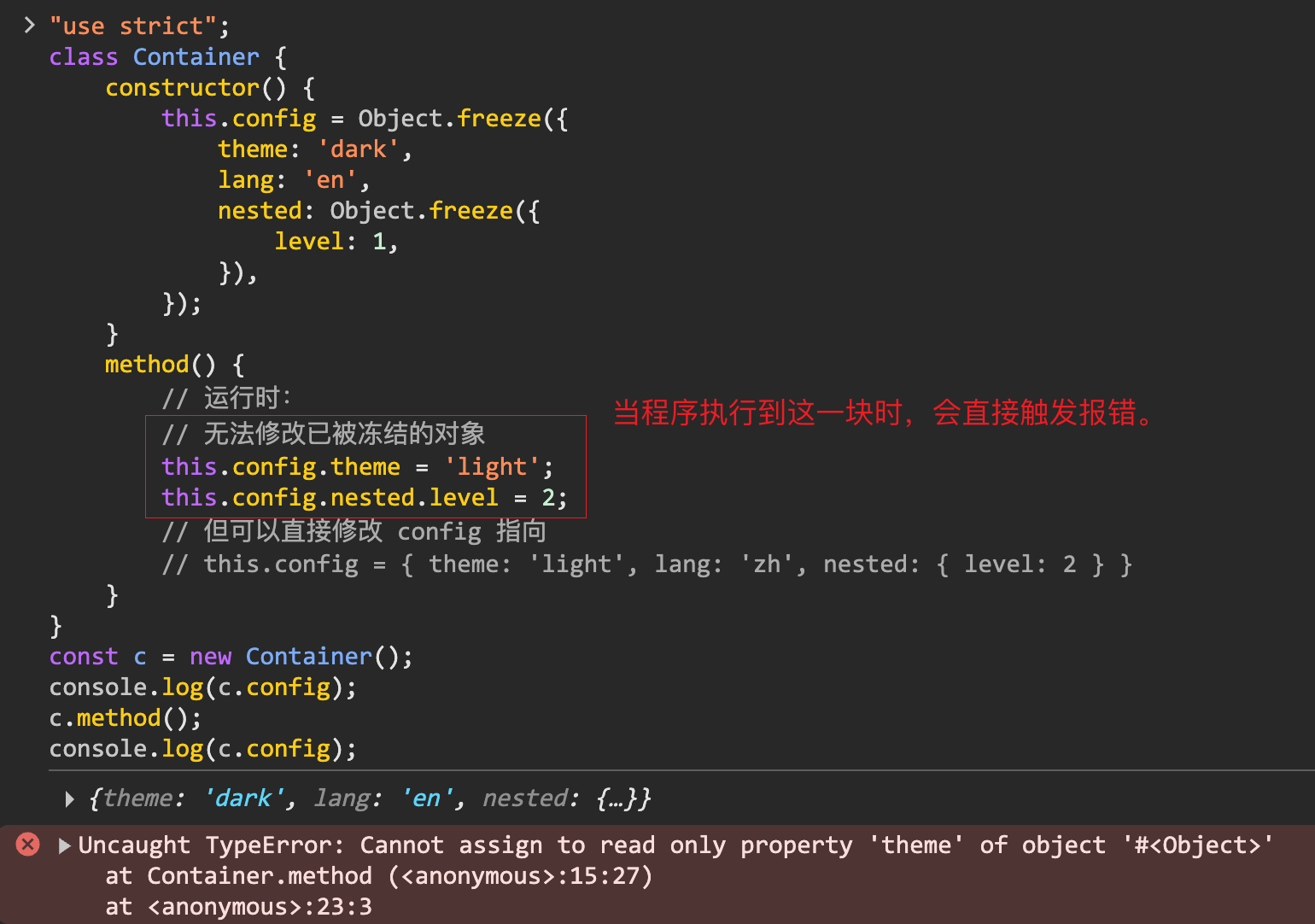
}使用 Object.freeze() 和使用 Readonly 看起来是一样的,不过核心区别在于 Object.freeze() 在编译后会被保留到 JS 中,对运行时造成影响。它的约束不仅限于 TS 类型层面。
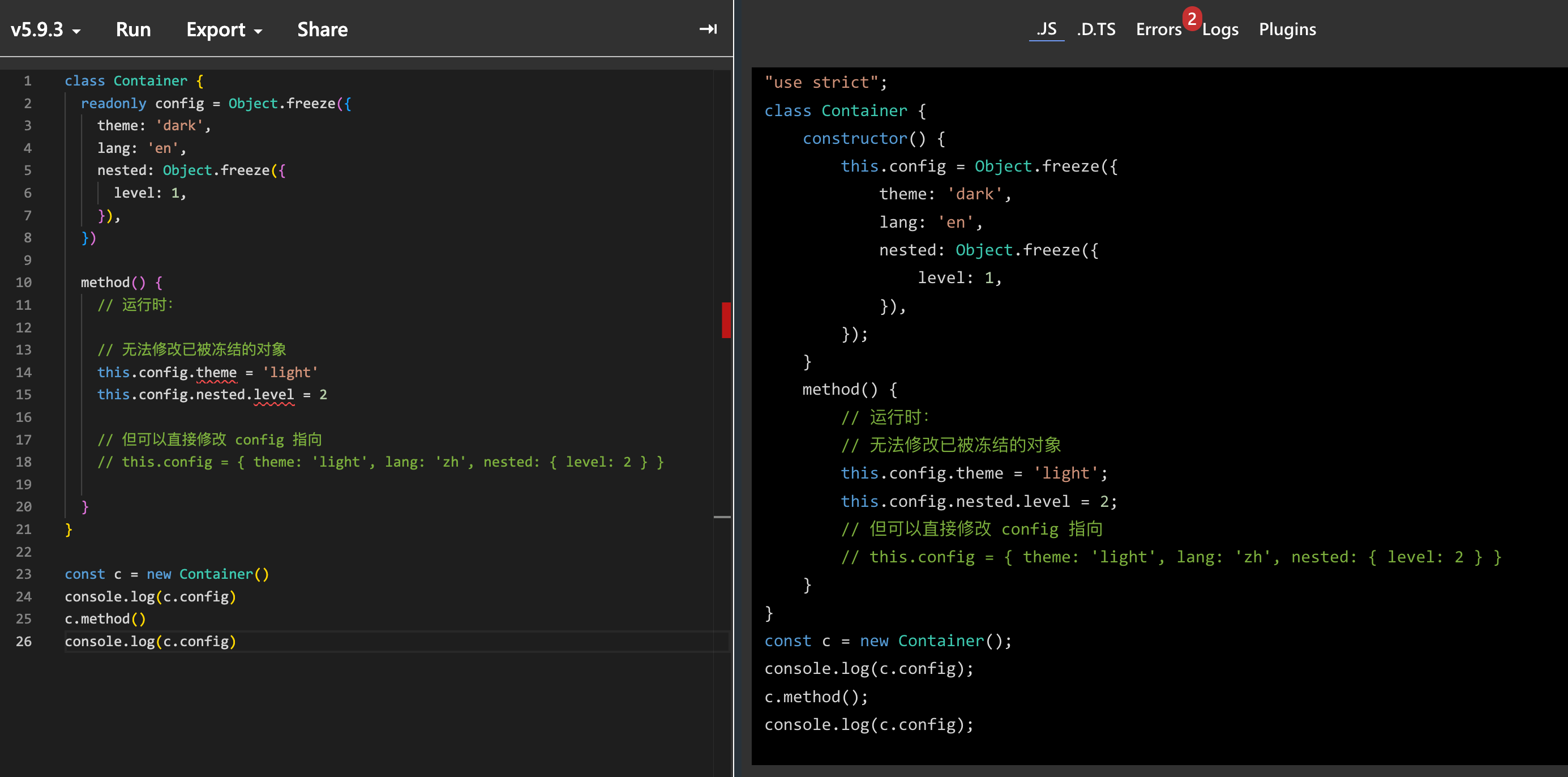
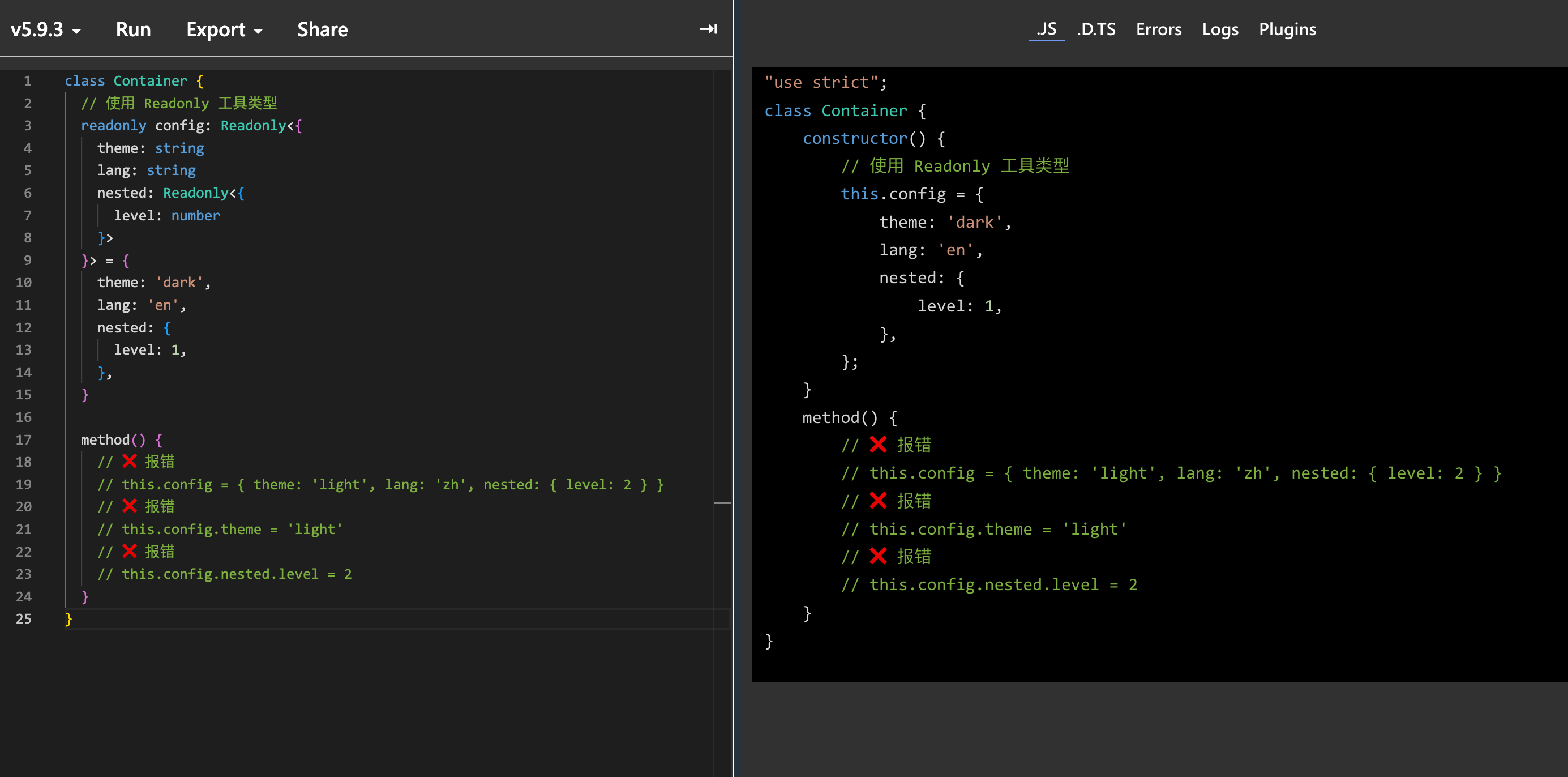
Object.freeze() 会对编译后的 JS 执行造成直接影响。
9.4. 使用 as const 断言
ts
class Container {
  readonly config = {
    theme: 'dark',
    lang: 'en',
    nested: {
      level: 1,
    },
  } as const

  method() {
    // ❌ 报错
    // this.config = { theme: 'light', lang: 'zh', nested: { level: 2 } }
    // ❌ 报错
    // this.config.theme = 'light'
    // ❌ 报错
    // this.config.nested.level = 2
  }
}10. 🤔 readonly 属性和只有 getter 的存取器属性有什么区别?
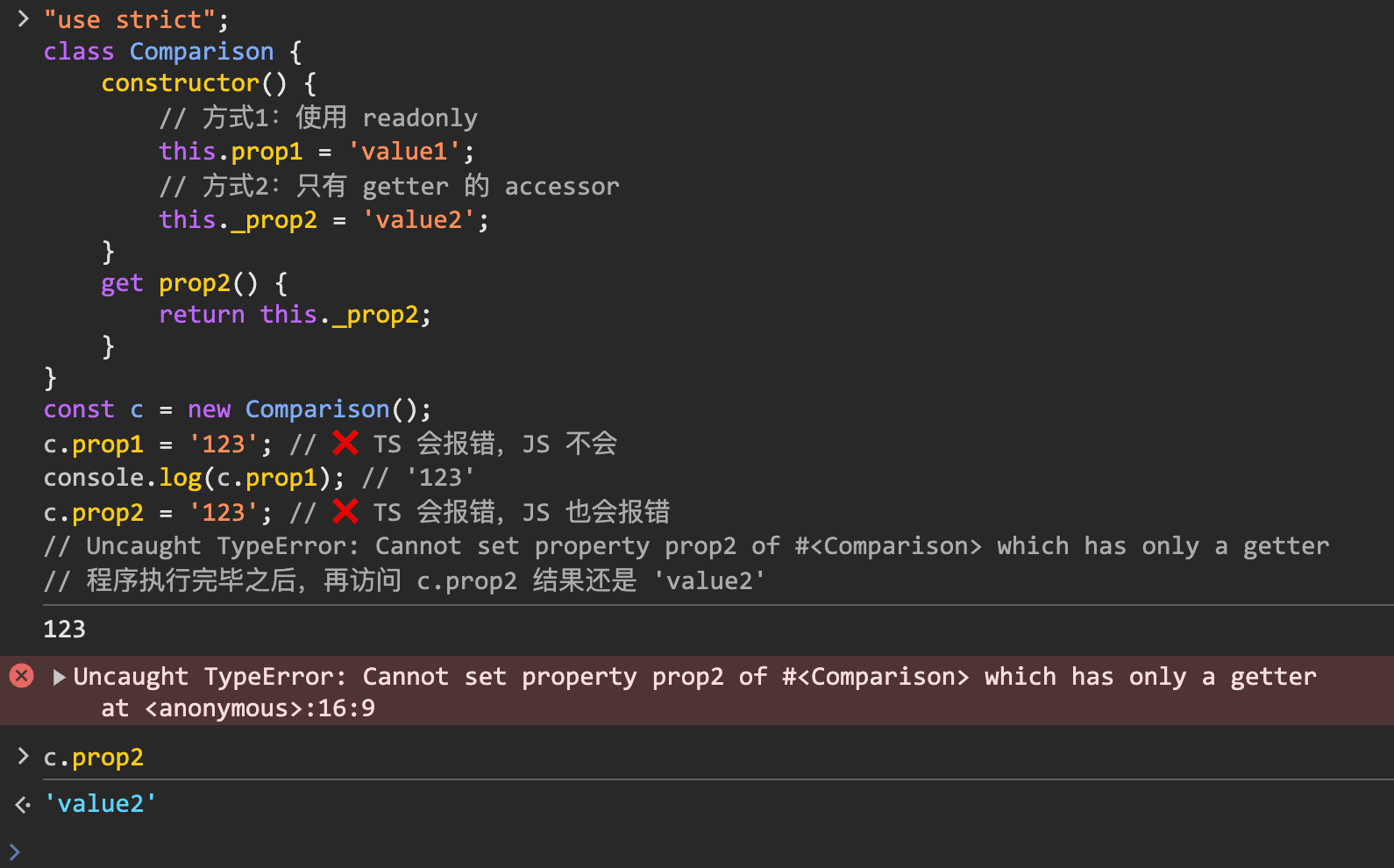
两者都是用来创建只读属性的,核心区别在于 readonly 是 TS 带有的特性,JS 中是不存在的,而 getter、setter 这些是 JS 也带有的特性。
换句话说就是:
- readonly 只在 TS 中起到提示作用,对最终编译结果的 JS 无影响
- getter、setter 既可以在 TS 中声明只读属性,获取到只读属性的约束提示,也可以在 JS 中强制约束程序的执行逻辑
ts
class Comparison {
  // 方式1:使用 readonly
  readonly prop1 = 'value1'

  // 方式2:只有 getter 的 accessor
  private _prop2 = 'value2'
  get prop2() {
    return this._prop2
  }
}下面是一个测试 demo:
ts
class Comparison {
  // 方式1:使用 readonly
  readonly prop1 = 'value1'

  // 方式2:只有 getter 的 accessor
  private _prop2 = 'value2'
  get prop2() {
    return this._prop2
  }
}

const c = new Comparison()

c.prop1 = '123' // ❌ TS 会报错,JS 不会
console.log(c.prop1) // '123'

c.prop2 = '123' // ❌ TS 会报错,JS 也会报错
// Uncaught TypeError: Cannot set property prop2 of #<Comparison> which has only a getter

// 程序执行完毕之后,再访问 c.prop2 结果还是 'value2'编译后得到的 JS 程序如下:
js
'use strict'
class Comparison {
  constructor() {
    // 方式1:使用 readonly
    this.prop1 = 'value1'
    // 方式2:只有 getter 的 accessor
    this._prop2 = 'value2'
  }
  get prop2() {
    return this._prop2
  }
}
const c = new Comparison()
c.prop1 = '123' // ❌ TS 会报错,JS 不会
console.log(c.prop1) // '123'
c.prop2 = '123' // ❌ TS 会报错,JS 也会报错
// Uncaught TypeError: Cannot set property prop2 of #<Comparison> which has only a getter
// 程序执行完毕之后,再访问 c.prop2 结果还是 'value2'你可以将编译后得到的 JS 程序复制到浏览器控制台快速测试: